บ้านอัจฉริยะไม่ได้เริ่มต้นที่วันติดตั้ง — มันเริ่มต้นตั้งแต่วันที่คุณยังถือแบบแปลนอยู่ในมือ สิ่งเล็กๆ ที่มองข้ามไปในช่วงก่อสร้าง อาจกลายเป็นค่าใช้จ่ายที่หนักหนาและงานที่ยุ่งยากภายหลัง บทความนี้รวบรวม 8 เรื่องสำคัญที่ผู้เชี่ยวชาญ PST แนะนำให้เตรียมตัว ก่อนที่ช่างจะเริ่มวางท่อและดึงสายA smart home doesn't begin on installation day — it begins when you're still holding the blueprints. Small things overlooked during construction can become costly problems later. This article covers the 8 critical things PST experts recommend preparing before contractors start laying conduit and pulling wire.
หลายคนเริ่มคิดเรื่อง Smart Home ตอนที่บ้านใกล้เสร็จแล้ว — แต่นั่นคือช่วงที่การเปลี่ยนแปลงแต่ละอย่างจะแพงที่สุด การเตรียมตัวให้ถูกต้องตั้งแต่ต้นไม่ได้แค่ประหยัดเงิน แต่ยังทำให้ระบบที่ได้ออกมา ทำงานได้ดีและสวยงามกว่าที่เคยจินตนาการไว้Many people start thinking about Smart Home when the build is nearly done — but that's exactly when changes cost the most. Getting it right from the start doesn't just save money; it results in a system that performs better and looks cleaner than you ever imagined.
1
Switch & Junction Box
เลือกขนาดสวิตช์ให้ถูก — ก่อนที่ช่างไฟจะเดินท่อChoose the Right Switch Size — Before Electricians Run Conduit
สิ่งที่คนมักมองข้ามมากที่สุดในการวางแผน Smart Home คือ ขนาดของกล่องฝังสวิตช์ — เรื่องที่ฟังดูเล็กน้อยแต่ส่งผลต่อทั้งความสวยงามและความสามารถในการติดตั้งอุปกรณ์อัจฉริยะในอนาคตThe most commonly overlooked detail when planning a Smart Home is the switch junction box size — a seemingly minor thing that has a major impact on aesthetics and future smart device compatibility.
2×4 (US) vs 3×3 — ต่างกันอย่างไร?2×4 (US) vs 3×3 — What's the Difference?
ราคาต่อช่องถูกกว่าเฉลี่ย 20–35%20–35% lower cost per slot on average
หน้ากากสวิตช์หาซื้อง่าย มีให้เลือกหลายดีไซน์Cover plates readily available in many designs
รองรับ Smart Switch Zigbee ได้ทุกยี่ห้อCompatible with all Zigbee Smart Switch brands
⬜ 3×3 นิ้ว (Euro)inch (Euro)
ดูกว้างขึ้น เหมาะกับ Aesthetic บางสไตล์Looks wider, suits certain aesthetic styles
อุปกรณ์รองรับน้อยกว่า โดยเฉพาะ Smart SwitchFewer compatible devices, especially Smart Switches
ราคาแพงกว่า และหาซื้อยากกว่าในไทยMore expensive and harder to source in Thailand
หากต้องเปลี่ยนมาทีหลัง ต้องสกัดกำแพงใหม่ทั้งหมดChanging later requires chiseling new wall openings
กล่องลึก — สิ่งที่หลายโครงการมองข้ามBox Depth — What Many Projects Overlook
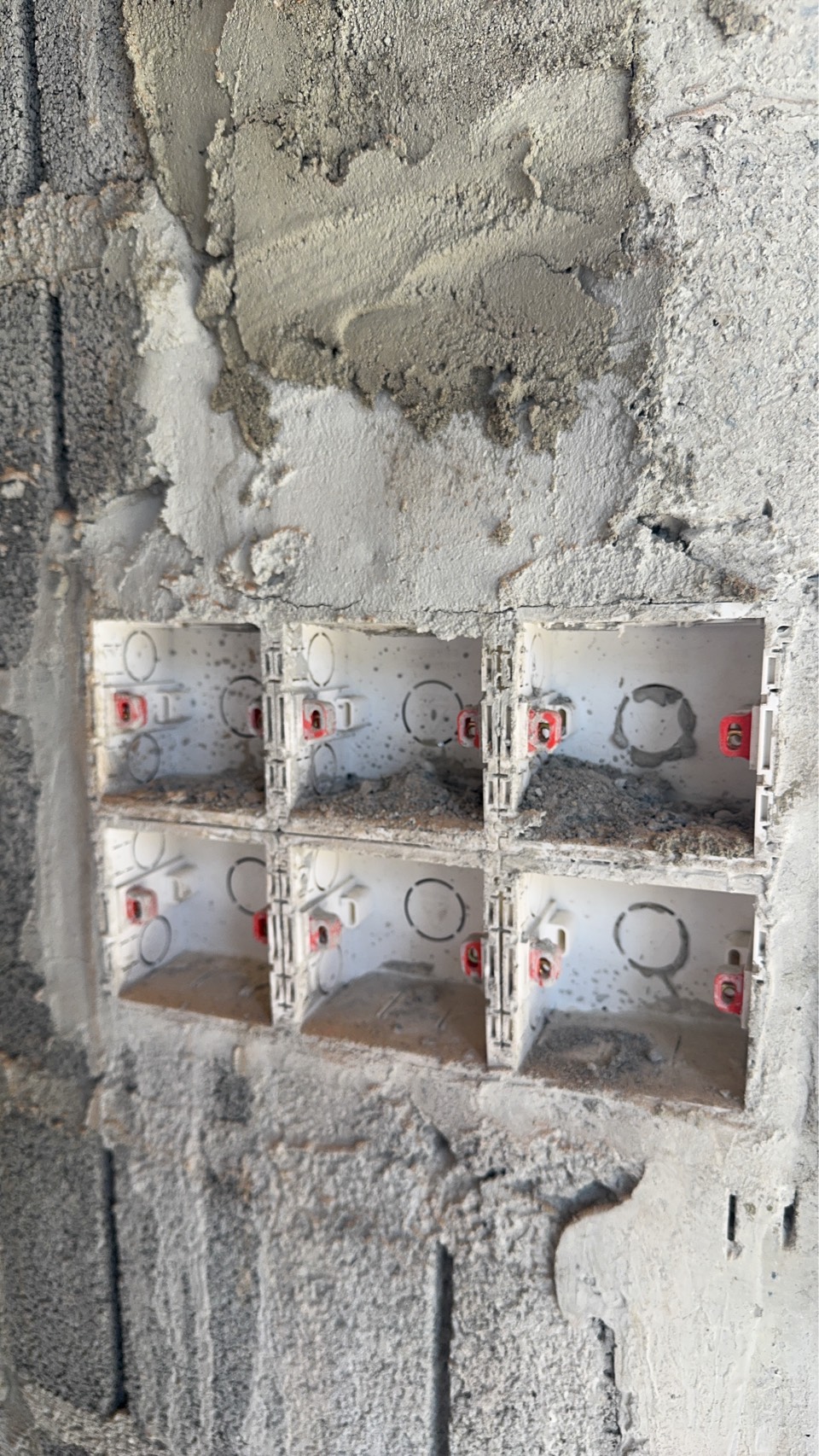
ไม่ว่าจะเลือกขนาดไหน สิ่งที่สำคัญไม่แพ้กันคือ ความลึกของกล่องฝัง สำหรับขนาด 2×4 ควรระบุให้ช่างไฟใช้กล่องที่มีความลึกอย่างน้อย 4.5 ซม. เพราะ Smart Switch มักมีชิ้นส่วนอิเล็กทรอนิกส์อยู่ด้านหลังมากกว่าสวิตช์ธรรมดาRegardless of which size you choose, equally important is the box depth. For 2×4 boxes, specify at least 4.5 cm depth — Smart Switches have more electronics behind them than standard switches.
กล่องที่ตื้นเกินไปจะทำให้ Smart Switch ยัดไม่ลง หรือต้องงัดสายไฟแบบที่อาจทำให้เกิดความเสียหายในภายหลัง — ปัญหาที่พบบ่อยมากในโครงการที่ไม่ได้วางแผนล่วงหน้าA too-shallow box means the Smart Switch won't fit, or wires get bent in ways that cause problems later — an extremely common issue in projects that didn't plan ahead.
คำแนะนำจากประสบการณ์จริง:From real experience:ระบุให้ชัดเจนกับผู้รับเหมาไฟฟ้าตั้งแต่ต้นว่า "กล่องลึก 4.5 ซม. สำหรับทุกจุดสวิตช์" หากปล่อยให้ช่างตัดสินใจเอง มักได้กล่องความลึก 3 ซม. ซึ่งเป็นอุปสรรคใหญ่ในการติดตั้งทีหลังClearly specify to your electrical contractor from the start: "4.5 cm deep boxes at every switch point." If left to decide themselves, contractors typically use 3 cm boxes — a major obstacle for later smart switch installation.
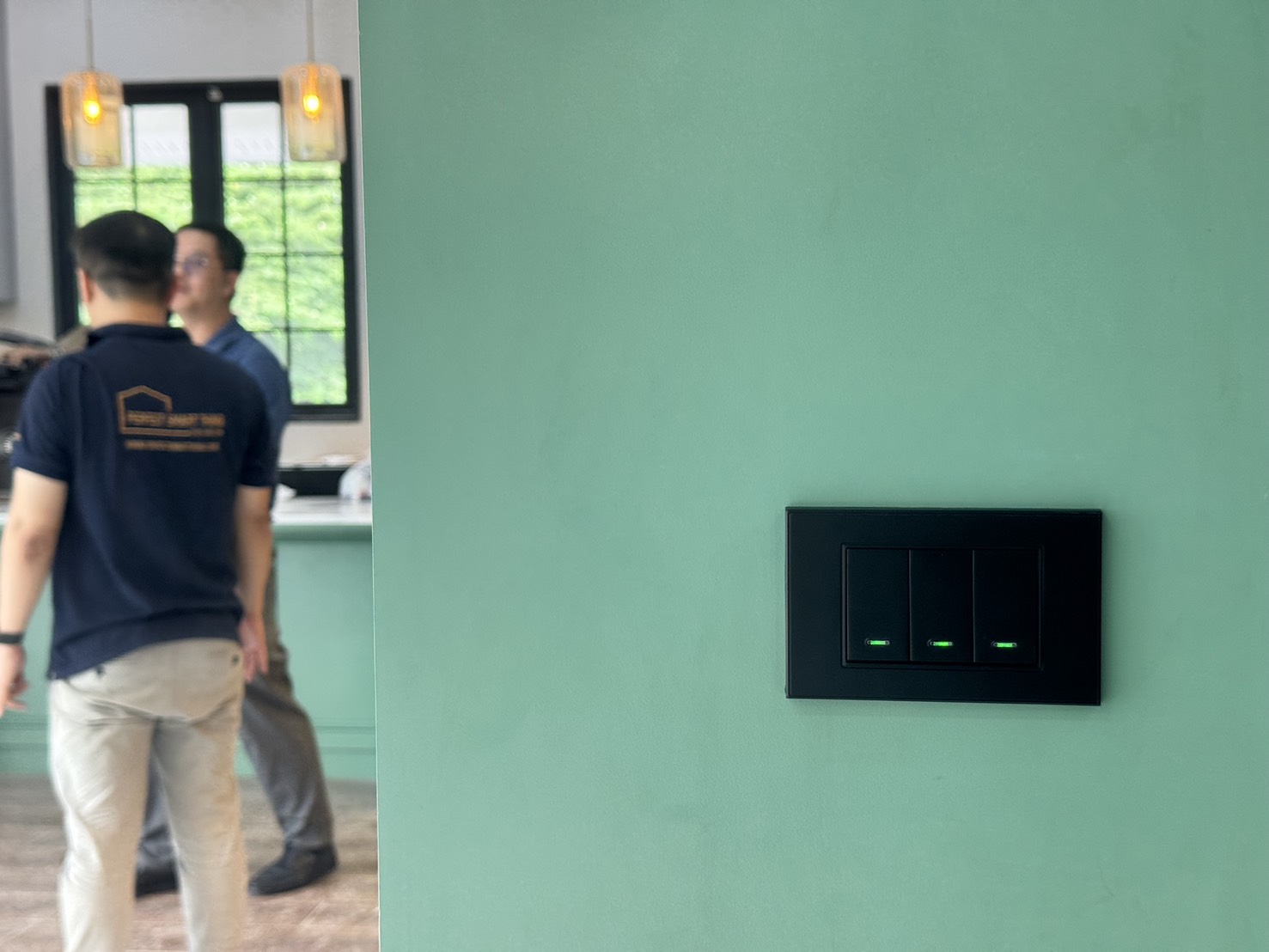
สวิตช์ขนาด 2×4 — มาตรฐานที่ Smart Switch รองรับกว้างที่สุด2×4 switch — the standard with the widest Smart Switch compatibility
กล่องลึก 4.5 ซม. — รองรับอิเล็กทรอนิกส์ด้านหลัง Smart Switch4.5 cm deep box — accommodates Smart Switch electronics at the back
2
Electrical Prep
สาย Neutral ตรงสวิตช์ทุกจุด — ไม่จำเป็น แต่เปลี่ยนทุกอย่างNeutral Wire at Every Switch — Not Mandatory, But It Changes Everything
ถามว่าบ้านอัจฉริยะ ต้องการ สาย Neutral ไหม? คำตอบคือ "ไม่บังคับ" — Smart Switch หลายรุ่นในปัจจุบันทำงานได้โดยไม่ต้องใช้ Neutral แต่ถ้าถามว่า ควร จะเดินสาย Neutral หรือไม่? คำตอบคือ "ทำทันทีถ้ายังอยู่ในช่วงก่อสร้าง"Does a smart home require a Neutral wire? The answer is "not mandatory" — many modern Smart Switches work without one. But should you run Neutral wire? The answer is "absolutely, if you're still in construction."
สาย Neutral คืออะไร และทำไมมันสำคัญ?What Is a Neutral Wire and Why Does It Matter?
ในวงจรไฟฟ้าบ้านทั่วไป สายที่เข้ามาที่จุดสวิตช์มักมีแค่ สาย Line (สายไฟ) เท่านั้น ส่วน Neutral จะวิ่งตรงไปยังโคมไฟแทน — ทำให้ Smart Switch ที่ต้องการไฟเลี้ยง Module อย่างต่อเนื่องต้องดึงกระแสเล็กน้อยผ่านหลอดไฟ ซึ่งอาจทำให้หลอดกะพริบหรือทำงานไม่เสถียรIn standard home wiring, only the Line wire reaches the switch box — the Neutral goes directly to the light fixture. Smart Switches needing continuous power must draw a small current through the bulb, which can cause flickering or unstable operation.
การเดิน สาย Neutral มาถึงกล่องสวิตช์ แก้ปัญหานี้ได้ทั้งหมด Smart Switch ได้รับไฟเลี้ยงที่สะอาดและเสถียร ทำงานได้แม้ปิดหลอดไฟ และรองรับ Smart Switch ทุกรุ่นในตลาดโดยไม่มีข้อจำกัดRunning a Neutral wire to the switch box solves all of this. Smart Switches receive clean, stable power, work even when lights are off, and are compatible with every Smart Switch on the market.
โบนัสที่คนไม่รู้: Neutral ทำให้ Zigbee แข็งแกร่งขึ้นThe Hidden Bonus: Neutral Makes Your Zigbee Network Stronger
นี่คือ insight ที่ผู้ใช้ทั่วไปมักไม่รู้ — ใน Zigbee Network มีอุปกรณ์ 2 ประเภท คือ End Device (อุปกรณ์ใช้ถ่าน เช่น เซ็นเซอร์) และ Router Node (อุปกรณ์ที่มีไฟเลี้ยงตลอด ช่วยกระจายสัญญาณ)This is something most users don't know — Zigbee has two device types: End Devices (battery-powered, like sensors) and Router Nodes (mains-powered devices that relay signals further).
Smart Switch ที่มีสาย Neutral จะทำหน้าที่เป็น Router Node อัตโนมัติ — ช่วยส่งสัญญาณ Zigbee ต่อออกไปยังทุกมุมบ้าน ยิ่งบ้านมี Smart Switch มาก สัญญาณ Zigbee ยิ่งแข็งแกร่งขึ้นแบบทวีคูณ เหมือนการสร้าง Mesh ในตัวอาคารA Neutral-wired Smart Switch automatically becomes a Zigbee Router Node — relaying signals to every corner of the house. More Smart Switches means exponentially stronger Zigbee coverage, like building an in-wall mesh network.
ในทางตรงข้าม Smart Switch แบบ No-Neutral ต้องดึงกระแสผ่านวงจรหลอดไฟ ทำให้ไม่สามารถทำหน้าที่ Router Node ได้ — สัญญาณ Zigbee อาจอ่อนในบางจุดโดยเฉพาะบ้านขนาดใหญ่No-Neutral switches must draw current through the bulb circuit and cannot act as Router Nodes — leading to weak Zigbee spots, especially in larger homes.
Zigbee Router ในสวิตช์ทุกตัว:Zigbee Routers Built Into Every Switch:บ้านที่มี Smart Switch แบบ Neutral 20 จุดทั่วบ้าน คือการมี Zigbee Repeater 20 ตัวกระจายอยู่ตามผนังทุกห้อง — ไม่ต้องซื้ออุปกรณ์ Repeater เพิ่ม สัญญาณครอบคลุมทุกมุมA home with 20 Neutral Smart Switches has 20 Zigbee repeaters built into the walls of every room — no extra repeater hardware needed, complete coverage in every corner.
ฝัง Module หรือเปลี่ยน Switch ใหม่ทั้งตัว?Embed a Smart Module or Replace the Whole Switch?
มี 2 แนวทางในการทำ Smart Switch: ฝัง Smart Module หลังสวิตช์เดิม หรือ เปลี่ยน Smart Switch ใหม่ทั้งตัว โดยสองแนวทางนี้มีข้อดีข้อเสียที่ต่างกันชัดเจนThere are 2 approaches: embedding a Smart Module behind an existing switch, or replacing with a full Smart Switch. Each has clear trade-offs.
🔧 ฝัง Smart ModuleEmbed Smart Module
คงหน้ากากสวิตช์เดิมไว้ได้ — ดีถ้าชอบ design เดิมKeeps existing switch face plate — good if you like the original look
ติดตั้งง่ายกว่าในบ้านที่ก่อสร้างเสร็จแล้วEasier to install in completed homes
ต้องการพื้นที่ในกล่องสวิตช์มากขึ้นRequires more space inside the junction box
การ Pair และ Debug ยากกว่าHarder to pair and debug
ไม่มี Local Button feedback บางกรณีNo local button feedback in some cases
Warranty ครอบคลุมทั้งระบบ ไม่มีจุดอับFull system warranty, no blind spots
PST เลือกแนวทาง เปลี่ยน Smart Switch ทั้งตัว เป็นหลัก เพราะนอกจากจะเสถียรกว่าแล้ว ยังทำให้งานติดตั้งสะอาด สวยงาม และดูแลรักษาง่ายกว่าในระยะยาว — ลูกค้าไม่ต้องกังวลว่า Module ที่ซุกอยู่หลังกำแพงจะเกิดปัญหาโดยไม่รู้ตัวPST primarily uses the full Smart Switch replacement approach. Beyond being more stable, it results in a cleaner, neater installation that's easier to maintain long-term — customers don't need to worry about hidden modules causing problems behind the wall.
หน้างานจริงReal Job Site
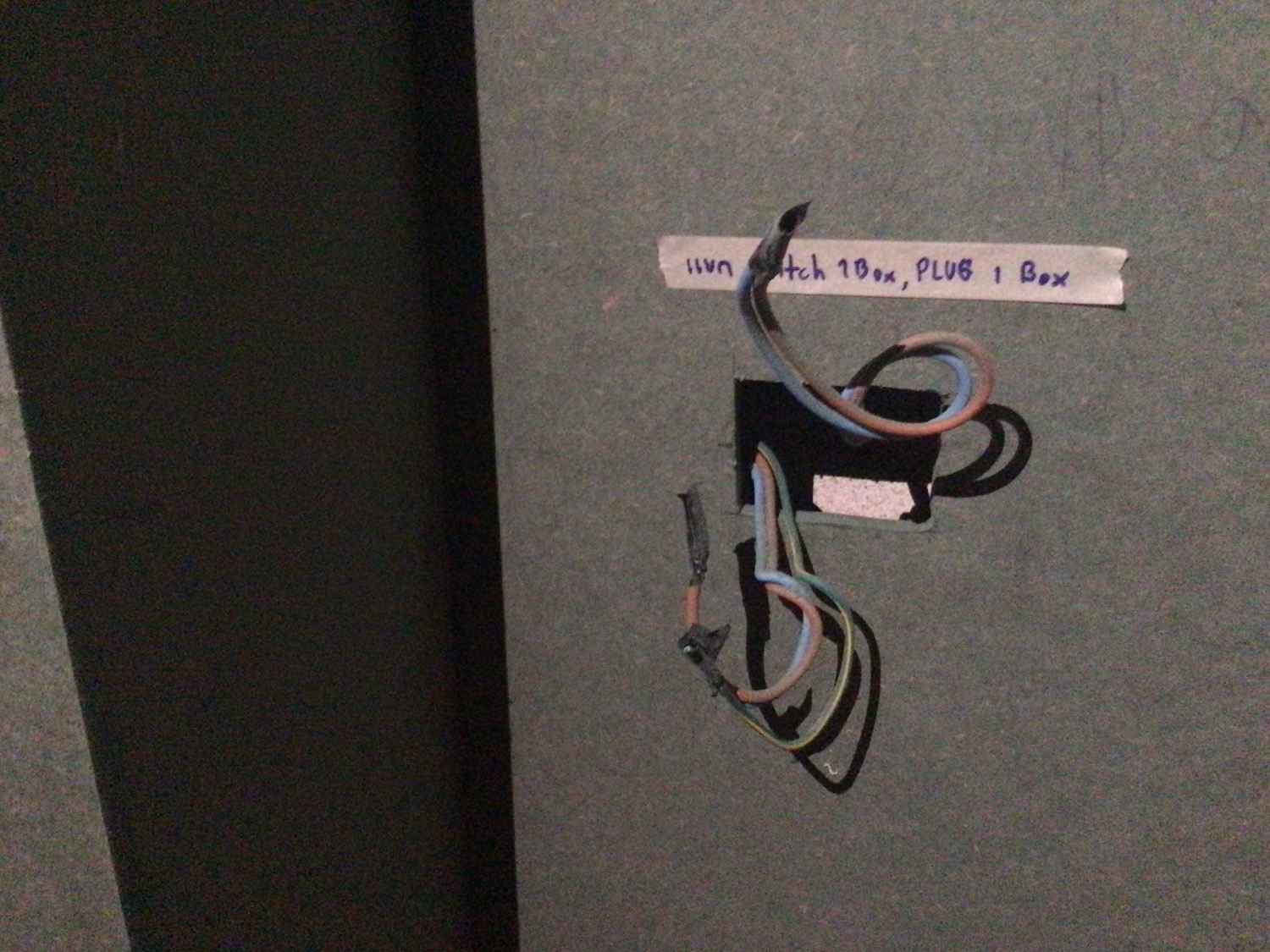
สายไฟที่บล็อคสวิตช์ในหน้างานจริง — สาย Neutral ที่เตรียมไว้ล่วงหน้าคือการลงทุนที่คุ้มค่าที่สุดWiring at the switch block on a real job — the Neutral wire prepared in advance is the best investment you can make
ปรึกษาฟรีFree Consultation
ไม่แน่ใจว่าบ้านคุณ เตรียมพร้อมแค่ไหน?Not Sure How Ready Your Home Is?
PST ช่วยประเมินแบบแปลนและให้คำแนะนำตั้งแต่ต้น — ก่อนที่ช่างจะเริ่มเดินสาย เพื่อให้งานออกมาสมบูรณ์ที่สุดโดยไม่ต้องแก้ภายหลังPST reviews your floor plans and advises from the start — before contractors begin wiring, so the result is perfect without costly rework.
หน้าจอ Controller — หัวใจของบ้านที่ต้องวางตำแหน่งให้ถูกController Display — The Heart of Your Home, Placed Right
หน้าจอ Controller คือจุดที่คุณและครอบครัวจะใช้ ควบคุมทุกอย่างในบ้านด้วยการแตะเดียว — ไฟ แอร์ กล้อง ประตู และ Automation ทั้งหมด มันไม่ใช่แค่หน้าจอสวยงาม แต่คือ Command Center ของระบบ Smart Home ทั้งหมดThe Controller display is where you and your family control everything in the home with a single tap — lights, AC, cameras, doors, and all automations. It's not just a pretty screen; it's the Command Center of your entire Smart Home system.
ทำไมตำแหน่งถึงสำคัญ?Why Does Placement Matter?
หน้าจอที่วางผิดตำแหน่งคือหน้าจอที่ไม่มีใครใช้ ตำแหน่งที่เหมาะสมควรอยู่ใกล้ทางเข้าบ้านหลัก เข้าถึงได้ทุกคนในครอบครัว และอยู่ในระดับสายตาที่สบาย ทั้งผู้ใหญ่และเด็ก การวางแผนตำแหน่งล่วงหน้าช่วยให้ เดินสายไฟและสาย Neutral มาเตรียมไว้ได้อย่างสวยงาม โดยไม่ต้องเดินสายเปลือยภายหลังA display in the wrong spot is a display nobody uses. The right location should be near the main entrance, accessible to everyone in the family, and at a comfortable eye level for both adults and children. Planning placement in advance means power and Neutral wires can be neatly pre-routed without exposed cables later.
ขนาดในตลาด — มีอะไรบ้าง?Available Sizes — What's on the Market?
ขนาดSize
เหมาะกับBest For
ข้อสังเกตNotes
7–8"
ห้องนอน, พื้นที่เล็กBedroom, small spaces
ราคาประหยัด แต่แสดงผลจำกัดBudget-friendly but limited display
10"
ห้องนั่งเล่น, ทางเดินLiving room, hallway
ขนาดกลาง ยอดนิยมMid-size, most popular
12–13"
Main Display, บ้านขนาดใหญ่Main display, larger homes
แสดงรายละเอียดได้ครบ เหมาะกับ 3D FloorplanFull detail, ideal for 3D Floorplan
15"+
Showroom, บ้านระดับ LuxuryShowroom, luxury homes
ประทับใจแรกพบ แต่ต้องวางตำแหน่งให้พอดีImpressive first impression, needs careful placement
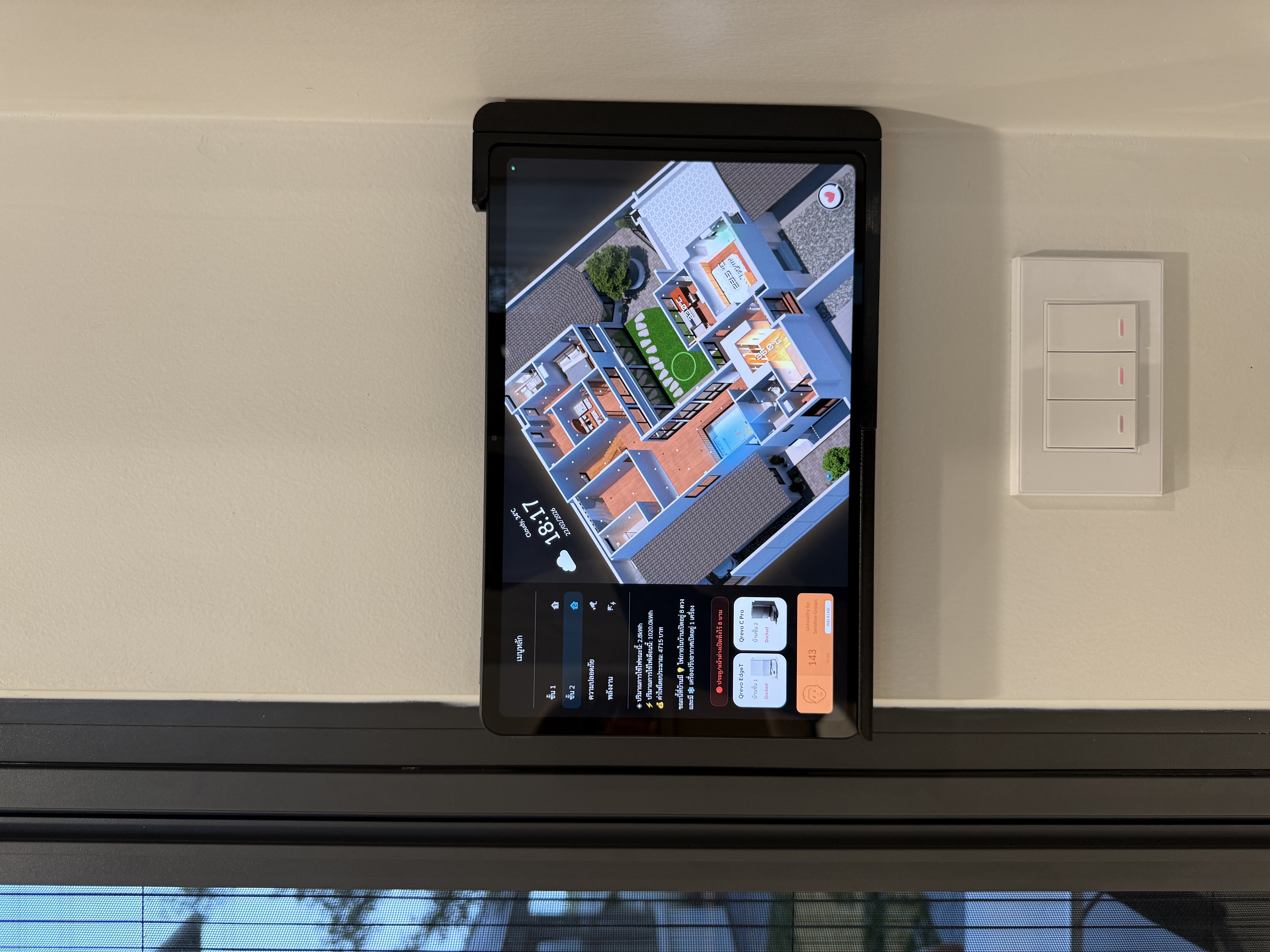
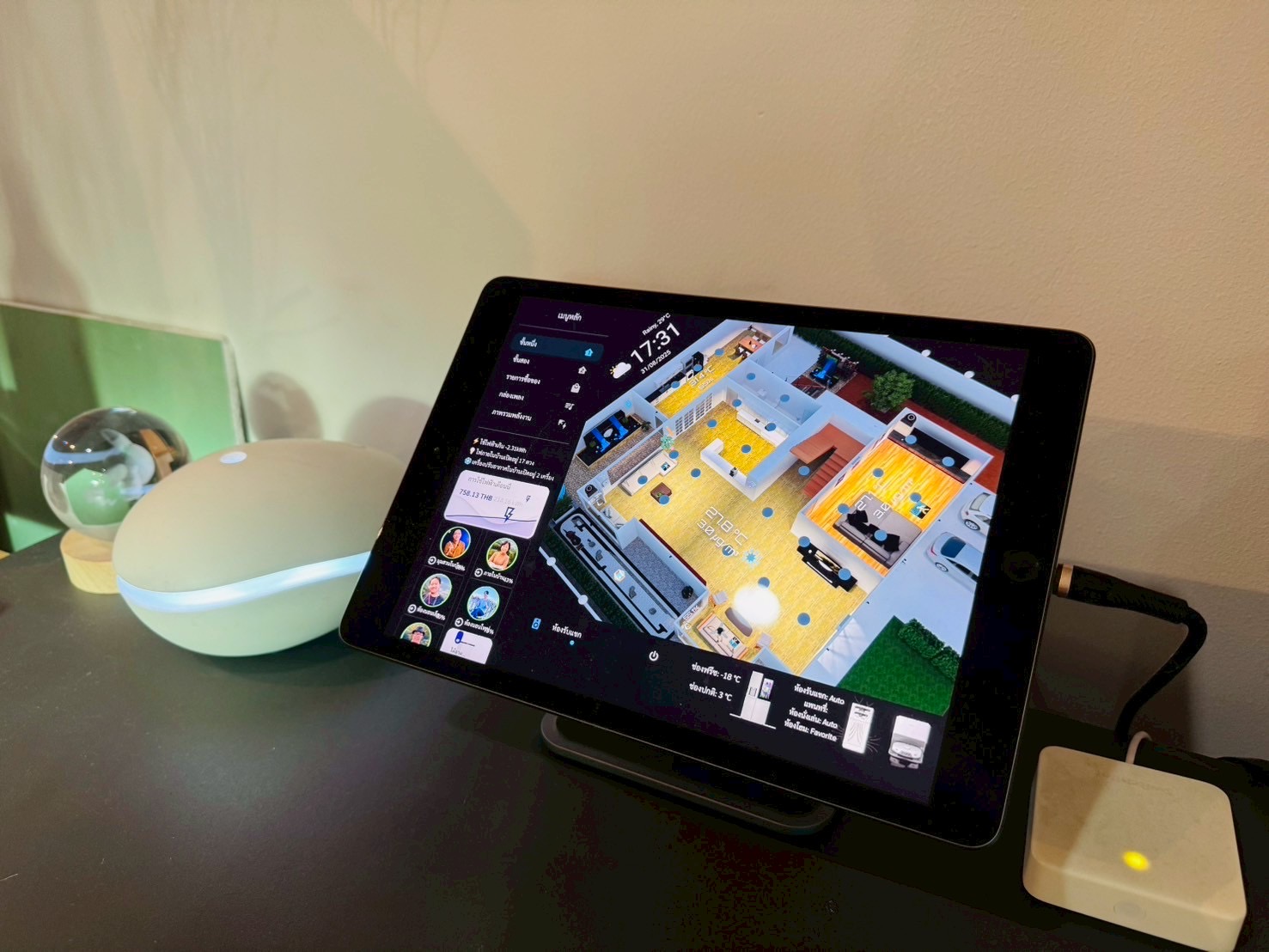
HomeDash Controller ของ PST ติดตั้งบนผนัง — แสดง 3D Floorplan เฉพาะบ้านของคุณPST HomeDash Controller wall-mounted — showing a custom 3D Floorplan of your actual home
จุดเด่นของ PST: HomeDash 12.1" — 3D บ้านคุณเท่านั้นPST's Signature: HomeDash 12.1" — Your Home in 3D, Only Yours
สิ่งที่ทำให้ระบบของ Perfect Smart Thing แตกต่างจากผู้ให้บริการทั่วไปคือ หน้าจอ HomeDash ขนาด 12.1 นิ้ว ที่แสดงผลบ้านของคุณในรูปแบบ 3D Floorplan สมจริง — ไม่ใช่ UI สำเร็จรูปที่ทุกบ้านใช้เหมือนกัน แต่เป็นโมเดล 3D ที่สร้างจากแบบแปลนบ้านของคุณโดยเฉพาะWhat sets Perfect Smart Thing apart is the 12.1" HomeDash display showing your home as a realistic 3D Floorplan — not a generic off-the-shelf UI that looks the same for every home, but a 3D model built specifically from your own floor plans.
🏠
3D Floorplan เฉพาะบ้านคุณYour Home's Own 3D Floorplanสร้างจากแบบแปลนจริง สมจริงทั้งแสงและเงา เห็นบ้านของตัวเองบนหน้าจอ ไม่ใช่ template สำเร็จรูปBuilt from your actual floor plan with realistic lighting and shadows — your home on screen, not a generic template
💡
ควบคุมได้จริง ไม่ใช่แค่สวยงามReal Control, Not Just a Pretty Displayแตะห้องใดก็ควบคุมไฟ แอร์ และอุปกรณ์ในห้องนั้นได้ทันที เห็น status จริง เปลี่ยนได้จริงTap any room to instantly control lights, AC, and devices — see live status, change it in real time
🌡️
แสดง Sensor Data แบบ Real-timeReal-time Sensor Data Overlayอุณหภูมิ ความชื้น คุณภาพอากาศ ปรากฏบนหน้าแปลนแต่ละห้อง เห็นว่าบ้านกำลังเป็นอย่างไรได้ในทันทีTemperature, humidity, and air quality shown per room on the floorplan — see exactly what's happening in your home at a glance
👨👩👧👦
ติดตามสมาชิกในบ้านTrack Who's Home and Whereรู้ว่าใครอยู่ห้องไหน ผ่าน Presence Sensor — เห็นภาพรวมทั้งบ้านในแวบเดียวKnow which room each family member is in via Presence Sensors — see the whole home at a glance
ติดผนัง vs บนโต๊ะWall-mounted vs Desk Stand
HomeDash รองรับทั้ง 2 รูปแบบ — ติดผนังด้วยสาย Neutral ฝังในผนัง หรือวางบนขาตั้งโต๊ะในกรณีที่ไม่ต้องการเจาะผนัง ความยืดหยุ่นที่ PST ออกแบบมาให้ทุกบ้านHomeDash supports both options — wall-mounted with a Neutral wire embedded in the wall, or on a desk stand if you prefer not to drill. PST-designed flexibility for every home.
HomeDash บนขาตั้งโต๊ะ — ไม่ต้องเจาะผนังHomeDash on desk stand — no wall drilling needed
สิ่งที่ต้องเตรียม:What to prepare:ระบุตำแหน่งหน้าจอล่วงหน้า แล้วเดิน Neutral + สาย Data มาเตรียมไว้ฝังในผนัง จุดที่นิยมคือทางเข้าหลัก ใกล้ประตูห้องนอน Master Bedroom และบริเวณห้องนั่งเล่น ทีม PST จะช่วยกำหนดตำแหน่งที่เหมาะสมในขั้นตอน ConsultIdentify display locations in advance, then route Neutral + Data cable behind the wall. Popular spots: main entrance, master bedroom door, and living room area. The PST team will help determine ideal positions during the consultation.
4
Security System
พิจารณา CCTV ตั้งแต่ต้น — งานสวย ประหยัด และฉลาดกว่าPlan CCTV From the Start — Cleaner, Cheaper, Smarter
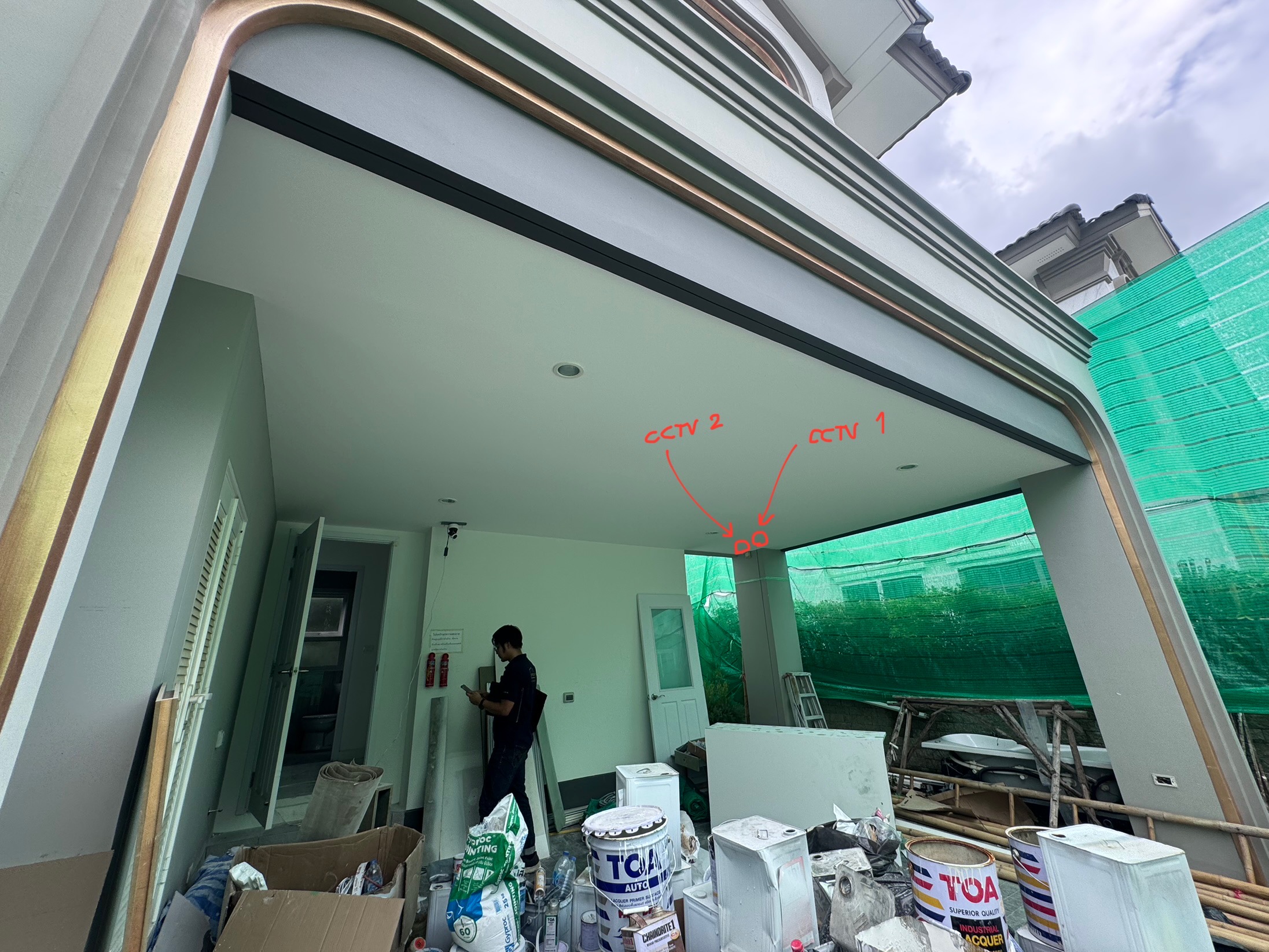
ไม่ใช่ทุกบ้านที่ต้องการ CCTV แต่ถ้าคิดจะติด ช่วงก่อสร้างคือเวลาทอง เพราะการ เดินท่อร้อยสายฝังฝ้าในช่วงงานระบบ ประหยัดกว่าและสวยงามกว่าการดึงสายเปลือยบนฝ้าทีหลังอย่างไม่ต้องเปรียบเทียบNot every home needs CCTV, but if you plan to install it, the construction phase is the golden window. Running conduit in the ceiling during the systems phase is incomparably cheaper and cleaner than pulling exposed cable across finished ceilings later.
ทำไม CCTV ถึงคุ้มค่ากว่าที่คิด?Why CCTV Is Worth More Than You Think
🔐
ความปลอดภัยที่มองเห็นและตรวจสอบได้Visible, Verifiable Securityไม่ใช่แค่ป้องกัน แต่ดูย้อนหลังได้ รู้ว่าเกิดอะไรขึ้น เมื่อไหร่ และที่ไหนNot just prevention — review footage to know exactly what happened, when, and where
🤖
CCTV + Frigate AI — ฉลาดยิ่งกว่าEven Smarterระบบ PST ใช้ Frigate ร่วมกับ Home Assistant แยกแยะ "คน รถ สัตว์เลี้ยง" ได้ แจ้งเตือนเฉพาะสิ่งสำคัญ ไม่รบกวนด้วย False Alert ทุกคืนPST's system uses Frigate with Home Assistant to distinguish "person, car, pet" — alerting you only to what matters, no false alarms every night
📱
ดูบนมือถือได้ตลอด 24 ชั่วโมงWatch Live on Your Phone Anytimeเชื่อมต่อกับ Home Assistant — ดูภาพสดได้ผ่าน App เดียวกับที่ควบคุมทั้งบ้าน ไม่ต้องสลับ App หลายตัวIntegrated with Home Assistant — view live footage in the same app that controls your whole home, no app-switching needed
⚡
ทริกเกอร์ Automation ได้Triggers Automationกล้องตรวจจับคนในพื้นที่ → เปิดไฟหน้าบ้านอัตโนมัติ → แจ้งเตือนมือถือ — ทำในระบบ PST ได้ทันทีCamera detects person in zone → auto front light on → mobile alert — all done instantly in the PST system
WiFi vs POE — เลือกแบบไหน?WiFi vs POE — Which Should You Choose?
📶 กล้อง WiFiWiFi Camera
ติดตั้งง่าย ไม่ต้องเดินสาย LANEasy to install, no LAN cable required
ยืดหยุ่นในการย้ายตำแหน่งFlexible repositioning
ต้องเตรียมปลั๊กไฟบริเวณฝ้าไว้ด้วยNeeds a power outlet near the ceiling point
สัญญาณ WiFi อาจไม่เสถียรในบางจุดWiFi signal may be unstable at some locations
เหมาะกับบ้านที่เสร็จแล้วหรือต้องการความยืดหยุ่นGood for completed homes or where flexibility is key
ใช้สาย LAN เดียวทั้งไฟและข้อมูล — งานสะอาดSingle LAN cable carries both power and data — clean install
สัญญาณเสถียรกว่า WiFi อย่างเห็นได้ชัดNoticeably more stable than WiFi
ต้องเดินท่อร้อยสาย LAN ในช่วงงานระบบRequires LAN conduit during the systems phase
ประหยัดค่าใช้จ่ายเมื่อเทียบกับการทำภายหลังMuch cheaper than retrofitting later
ผลงานออกมาสวยงาม ไม่มีสายเกะกะClean, professional finish — no exposed cables
เคล็ดลับ Pro จาก PST:Pro Tip from PST:จุดฝ้าที่วางแผนไว้สำหรับกล้อง CCTV WiFi? พิจารณาให้ทำปลั๊กไฟ ขนาดใหญ่ขึ้นอีกหน่อย — เพราะจุดเดียวกันนั้นสามารถใช้ติดตั้ง Presence / Motion Sensor ที่ต้องเสียบไฟร่วมกันได้เลย ประหยัดทั้งจุดปลั๊กและค่าแรงช่างPlanning a ceiling point for a WiFi CCTV camera? Consider making the power outlet slightly larger — that same point can also host a Presence / Motion Sensor that needs power, saving you both outlet points and labour costs.
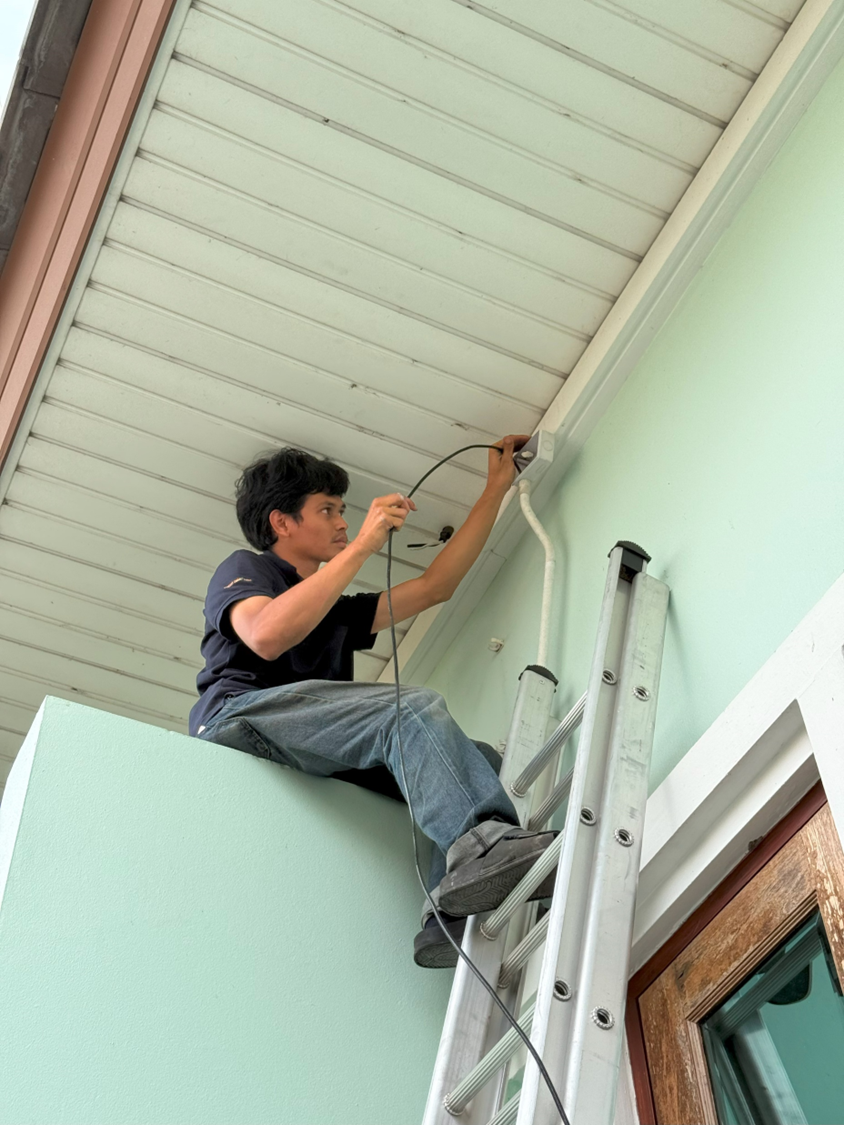
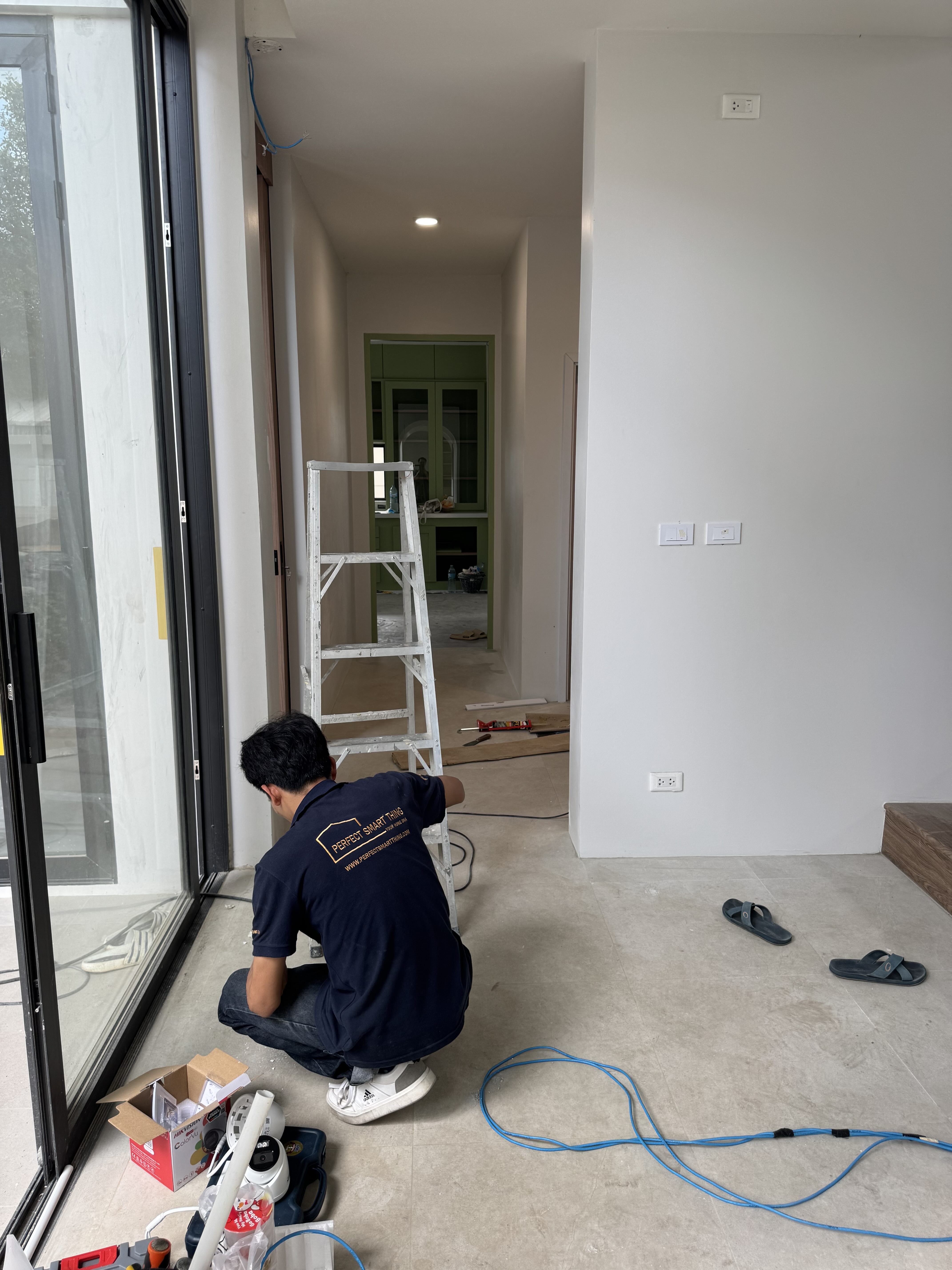
ช่างผู้เชี่ยวชาญของ PST ติดตั้งกล้อง CCTV อย่างพิถีพิถันPST specialist technician installing CCTV with care
วางแผนตำแหน่งล่วงหน้า — ไม่มีมุมอับหลังงานเสร็จPre-planned positions — no blind spots when the job is done
5
Sensors & Detection
Sensor — ประสาทสัมผัสของบ้านที่ฉลาดจริงๆSensors — The True Senses of a Smart Home
บ้านอัจฉริยะที่ไม่มี Sensor ก็เหมือนคนที่ตาบอด หู หนวก — ระบบจะทำงานได้ดีแค่ไหน ขึ้นอยู่กับว่า บ้านรับรู้สิ่งที่เกิดขึ้นรอบตัวได้มากแค่ไหนA smart home without sensors is like a person who can't see or hear — how well the system performs depends entirely on how much the home can perceive about its environment.
Sensor พื้นฐานที่ควรพิจารณาEssential Sensors to Consider
🚪
Door & Window Sensorรู้ทันทีว่าประตูหน้าต่างไหนเปิดหรือปิด — แจ้งเตือนเมื่อมีคนเข้าออก ปิดแอร์อัตโนมัติเมื่อเปิดหน้าต่าง ล็อกบ้านอัตโนมัติเมื่อออกไปKnow instantly which door or window is open or closed — alert on entry/exit, auto-off AC when windows open, auto-lock when you leave
💧
Water Leak Sensorวางใต้เครื่องซักผ้า ตู้เย็น หรือใต้อ่างล้างหน้า — แจ้งเตือนก่อนที่น้ำรั่วจะกลายเป็นความเสียหายที่แก้ไขไม่ได้Place under the washing machine, fridge, or sink — alerts you before a leak becomes irreversible damage
🌡️
Temperature & Humidity + Air Qualityปรับแอร์อัตโนมัติตามอุณหภูมิจริง ไม่ใช่แค่ตั้งเวลา รู้ว่าห้องไหน PM2.5 สูงก่อนที่จะรู้สึกได้Auto-adjust AC based on actual temperature, not just a timer. Know which room has high PM2.5 before you can feel it
⚡
Energy Monitorรู้ว่าอุปกรณ์ไหนกินไฟมาก แจ้งเตือนเมื่อลืมเปิดทิ้ง คำนวณค่าไฟได้แบบ Real-timeKnow which devices consume the most power, alert when left on accidentally, real-time electricity cost calculation
ความสามารถพิเศษที่มีได้เฉพาะที่ PSTExclusive Capabilities Only at PST
🎭 "Auto Night Mode" ที่ฉลาดกว่าทุกเจ้า:Smarter Than Anyone Else's:Door Sensor ประตูห้องนอน + Presence Sensor + เวลา → ระบบรู้ว่าคุณกำลังจะนอน → หรี่ไฟทั้งบ้าน ปิดทีวี ปรับแอร์ โดยไม่ต้องพูดหรือแตะอะไรเลยBedroom door sensor + Presence Sensor + time → system knows you're going to sleep → dims all lights, turns off TV, adjusts AC — without you saying or touching anything
📦 "Package Arrival Alert":กล้องหน้าบ้าน + Frigate AI ตรวจจับคนวางของ → แจ้งเตือนพร้อมภาพ "มีพัสดุมาส่ง" ทันที แม้คุณจะอยู่ที่ทำงานFront camera + Frigate AI detects someone placing a parcel → instant alert with image "Package delivered" — even when you're at the office
Presence Sensor — ตัวเลือกที่สำคัญที่สุดThe Most Important Sensor Choice
ถ้าต้องเลือก Sensor แค่ตัวเดียว — Presence Sensor คือคำตอบ มันรับรู้ว่ามีคนอยู่ในพื้นที่จริงหรือไม่ ไม่ใช่แค่ตรวจจับการเคลื่อนไหว ทำให้บ้านฉลาดขึ้นในระดับที่ Motion Sensor ธรรมดาทำไม่ได้If you can only choose one sensor — Presence Sensor is the answer. It detects whether a person is actually present, not just movement. This makes your home smarter in ways a standard Motion Sensor simply cannot.
ต้องเตรียมจุดปลั๊กหรือสาย USB ไว้ใกล้ๆNeeds a power outlet or USB cable nearby
บางรุ่นมีฟีเจอร์มากกว่า (เสียง, ไฟ LED)Some models have extra features (sound, LED indicator)
ย้ายตำแหน่งยากกว่าHarder to relocate
PST ใช้ Presence Sensor เทคโนโลยี 60GHz mmWave ซึ่งเป็น Multifunctional Sensor คุณภาพสูง สามารถตรวจจับการมีอยู่ของคน วัดอุณหภูมิ ความชื้น และความสว่างได้ในตัวเดียว — ลดจำนวน Sensor ที่ต้องติดตั้ง ลดความยุ่งเหยิง และทำงานได้แม่นยำกว่า PIR ธรรมดาอย่างเห็นได้ชัดPST uses 60GHz mmWave Presence Sensor technology — a high-quality multifunctional sensor that detects presence, measures temperature, humidity, and light level in one unit. Fewer sensors to install, less clutter, and visibly more accurate than standard PIR.
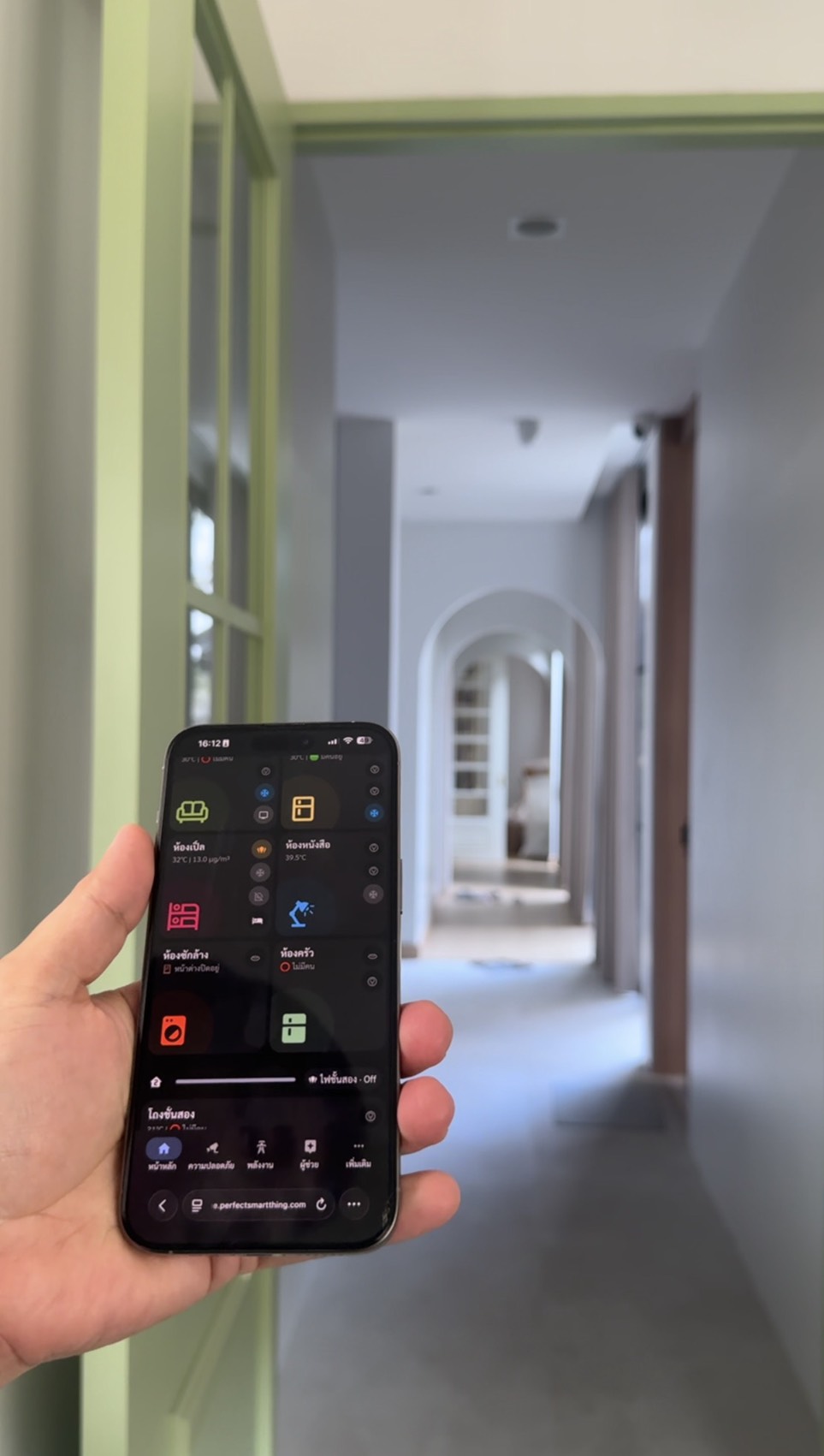
Mobile Dashboard — เห็น Sensor Data ทุกมุมบ้าน Real-timeMobile Dashboard — real-time sensor data from every corner of the home
ระบบ PST ในบ้านจริงPST System in a Real Home
ภาพจาก Mobile Dashboard ของ PST — ถ่ายจากหน้าจอโทรศัพท์มองไปยังโถงทางเดินของบ้านลูกค้าจริง แสดงให้เห็นว่าระบบ Sensor ทำงานอย่างไรในสภาพแวดล้อมจริงScreenshot from PST's Mobile Dashboard — taken from a phone screen looking down a real customer's hallway, showing how the sensor system works in a live environment.
ข้อมูลอุณหภูมิ ความชื้น และการตรวจจับคนปรากฏในแอปเดียวกับที่ควบคุมทั้งบ้าน — ไม่ต้องสลับ AppTemperature, humidity, and presence data all appear in the same app that controls your whole home — no app-switching needed.
6
Climate Control
ระบบปรับอากาศ — เลือกให้ถูกตั้งแต่ต้น เพื่อควบคุมได้จริงAir Conditioning — Choose Right From the Start for Real Control
แอร์คือหนึ่งในอุปกรณ์ที่มีผลต่อความสะดวกสบายในบ้านมากที่สุด และในระบบ Smart Home แอร์ที่ "ควบคุมได้จริง" กับแอร์ที่ "ควบคุมได้แบบจำกัด" คือความแตกต่างที่คุณจะรู้สึกได้ทุกวันAir conditioning is one of the biggest factors in home comfort, and in a Smart Home the difference between "truly controllable" and "limited control" AC is something you'll feel every single day.
เลือกประเภทแอร์ให้เหมาะกับห้องChoose the Right AC Type for Each Room
ประเภทType
เหมาะกับBest For
ข้อพิจารณาConsiderations
แบบแขวน (Wall Type)Wall-mounted (Wall Type)
ห้องนอน ห้องทำงาน พื้นที่ขนาดกลางBedroom, home office, mid-size rooms
ติดตั้งง่าย ดูแลง่าย ราคาเข้าถึงได้Easy to install and maintain, accessible pricing
ห้องโถง ห้องนั่งเล่นขนาดใหญ่ OfficeLobby, large living room, office
กระจายลมสม่ำเสมอ สวยงาม ไม่กินพื้นที่ผนังEven airflow, clean look, no wall space used
แบบฝังฝ้า 1 ทิศทาง (Ducted)Ducted (Concealed)
บ้านที่ต้องการฝ่อลม ห้องที่ซ่อน GrilleHomes with ducted air, rooms with hidden grilles
สวยมาก แต่ต้องวางแผนตั้งแต่ขั้นแบบVery clean look, but must be planned at blueprint stage
แบบตั้งพื้น (Floor Standing)Floor Standing
ห้องที่ไม่มีฝ้า พื้นที่พิเศษRooms without ceiling, specialty spaces
ยืดหยุ่นสูงสุด แต่กินพื้นที่Maximum flexibility, but takes up floor space
IR Blaster vs Native Smart — ต่างกันมากกว่าที่คิดIR Blaster vs Native Smart — The Difference Is Bigger Than You Think
ผู้ให้บริการ Smart Home หลายเจ้าใช้วิธี IR Blaster (อุปกรณ์จำลองรีโมต) ในการควบคุมแอร์ — ฟังดูสะดวก แต่มีข้อจำกัดสำคัญ ระบบจะรู้แค่ว่า "ส่งคำสั่ง" ไปแล้ว แต่ ไม่รู้ว่าแอร์ตอบสนองจริงไหม ไม่รู้อุณหภูมิจริงของแอร์ และไม่สามารถอ่าน Feedback กลับมาได้Many Smart Home providers use an IR Blaster (a remote-emulating device) to control AC — it sounds convenient but has a critical limitation: the system only knows it "sent the command" but has no idea if the AC actually responded, what temperature it's currently set to, or any feedback at all.
📡 IR Blaster
ใช้ได้กับแอร์เกือบทุกยี่ห้อWorks with almost any AC brand
ราคาถูก ติดตั้งง่ายInexpensive and easy to install
ไม่รู้สถานะจริงของแอร์No knowledge of actual AC state
ไม่สามารถอ่านค่าอุณหภูมิจากแอร์ได้Cannot read temperature setting from AC
Automation อาจผิดพลาดเมื่อแอร์ไม่ตอบสนองAutomations can fail silently when AC doesn't respond
✅ Native Smart Integration แนะนำRecommended
อ่านสถานะจริงจากแอร์ได้แบบ Two-wayTrue two-way status reading from the AC unit
รู้ว่าแอร์เปิด/ปิด อุณหภูมิที่ตั้ง โหมดปัจจุบันKnows on/off state, set temperature, and current mode
Automation ทำงานแม่นยำ — "ปิดแอร์เมื่อไม่มีคนในห้อง" ทำงานได้จริงReliable automations — "turn off AC when room is empty" actually works
ควบคุมผ่าน App เดียวกับทั้งบ้านControl through the same app as your whole home
Energy Monitoring ได้แม่นยำAccurate energy monitoring
คำแนะนำจาก PST:Advice from PST:การเลือกแบรนด์และรุ่นแอร์ที่รองรับ Smart Home Native Integration มีความสำคัญมาก ปรึกษาผู้เชี่ยวชาญก่อนตัดสินใจซื้อ เพราะบางรุ่นที่ราคาใกล้กัน แต่ความสามารถ Smart Integration ต่างกันโดยสิ้นเชิง ติดต่อ PST Expert เพื่อรับคำแนะนำรุ่นและแบรนด์ที่เหมาะกับงบประมาณและโจทย์ของคุณโดยเฉพาะChoosing the right AC brand and model with native Smart Home integration is critically important. Consult an expert before buying — some similarly-priced models have completely different Smart integration capabilities. Contact a PST Expert for model and brand recommendations tailored to your budget and requirements.
หน้างานจริงReal Job Site
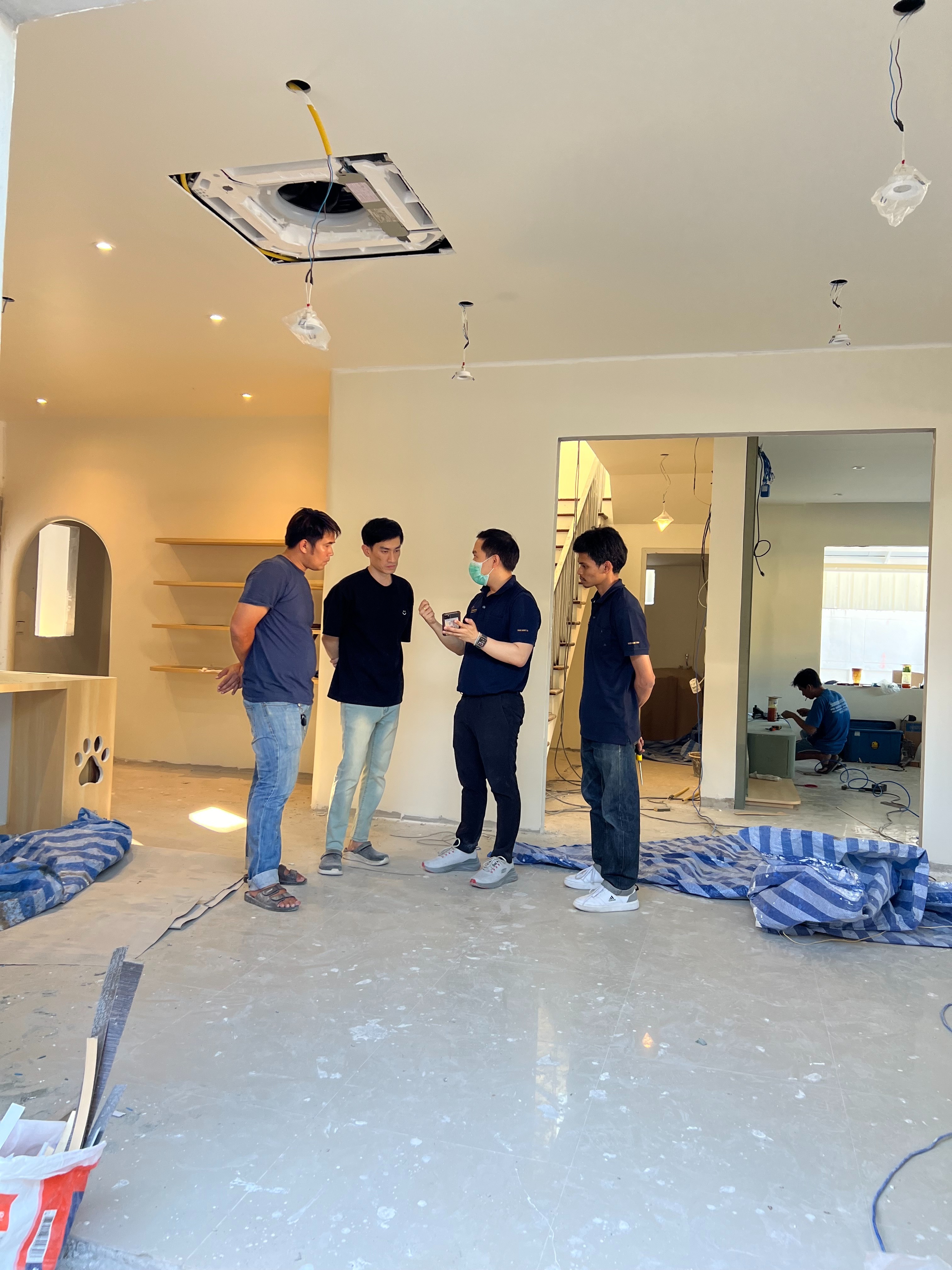
ทีม PST คุยกับลูกค้าตั้งแต่ช่วงฝ้าเปิด — วางแผนตำแหน่งแอร์ Cassette ก่อนปิดหน้าฝ้าPST team consulting with the client while the ceiling is still open — planning Cassette AC positions before closing the ceiling
7
Project Timeline
ช่วงเวลาที่ใช่ — เริ่มเมื่อไหร่ถึงได้ระบบที่สมบูรณ์The Right Time — When to Start for a Complete System
Smart Home ไม่ใช่อุปกรณ์ที่ซื้อมาแล้วเสียบได้เลย — มันคือระบบที่ต้องวางแผนไปพร้อมกับบ้าน การรู้ว่า ควรเริ่มคุยกับผู้เชี่ยวชาญเมื่อไหร่ คือความได้เปรียบที่ส่งผลต่อทั้งคุณภาพงานและค่าใช้จ่ายสุดท้ายA Smart Home isn't something you buy and plug in — it's a system that must be planned alongside the build. Knowing when to start talking to an expert is an advantage that directly affects both final quality and total cost.
Timeline ที่เหมาะสมที่สุดThe Ideal Timeline
📐
ช่วงได้แบบ — เริ่มคุย PST ได้เลยBlueprint Stage — Start Talking to PST Nowตอนที่ยังมีแบบ Lighting Plan และ Climate Plan อยู่ในมือ คือจังหวะที่ PST สามารถแนะนำตำแหน่งกล่องสวิตช์ จุดวาง Controller จุดกล้อง และ Sensor ได้อย่างสมบูรณ์ที่สุด ก่อนที่ช่างจะวางท่อWhile you still have Lighting Plan and Climate Plan in hand, PST can advise on switch box positions, Controller placement, camera points, and Sensor locations — before contractors lay any conduit
🔧
ช่วงงานระบบ (ไฟฟ้า) — เข้าสำรวจร่วมกันElectrical Systems Phase — Joint Site SurveyPST ประสานงานกับผู้รับเหมาระบบไฟฟ้า ตรวจสอบจุดสวิตช์ ท่อร้อยสาย และการเตรียม Neutral ให้ครบทุกจุดก่อนโบกปิด — เพราะหลังโบกแล้ว ทุกอย่างแก้ได้ แต่แพงมากPST coordinates with the electrical contractor to verify switch points, conduit runs, and Neutral wire preparation at every point before walls are plastered — because after plastering, everything can still be fixed, but at a very high cost
🏗️
งาน Built 50–80% — เริ่มเข้าติดตั้งอุปกรณ์Build 50–80% Complete — Begin Device Installationช่วงที่บ้านเริ่มเป็นรูปร่าง ฝ้าเรียบร้อย ผนังเสร็จ แต่ยังไม่วางเฟอร์นิเจอร์ คือเวลาที่เหมาะสมที่สุดในการติดตั้ง Switch, Sensor, กล้อง และ Controller ทำได้สะดวก ไม่ต้องย้ายของWhen the house is taking shape — ceilings finished, walls done, but no furniture yet — this is the ideal time to install Switches, Sensors, cameras, and the Controller. Easy access, no moving things around
✅
บ้านเสร็จ 100% — Commissioning & Training100% Complete — Commissioning & TrainingPST เข้า Commission ระบบ Setup Automation ทั้งหมด และ Training การใช้งานให้ทุกคนในบ้าน พร้อม Handover Documentation ครบชุดPST commissions the system, sets up all automations, and trains every household member — with a complete Handover Documentation package
ช่าง PST ดูแบบก่อนลงมือ — ทุกขั้นตอนวางแผนอย่างละเอียดPST technician reviews plans before starting — every step meticulously planned
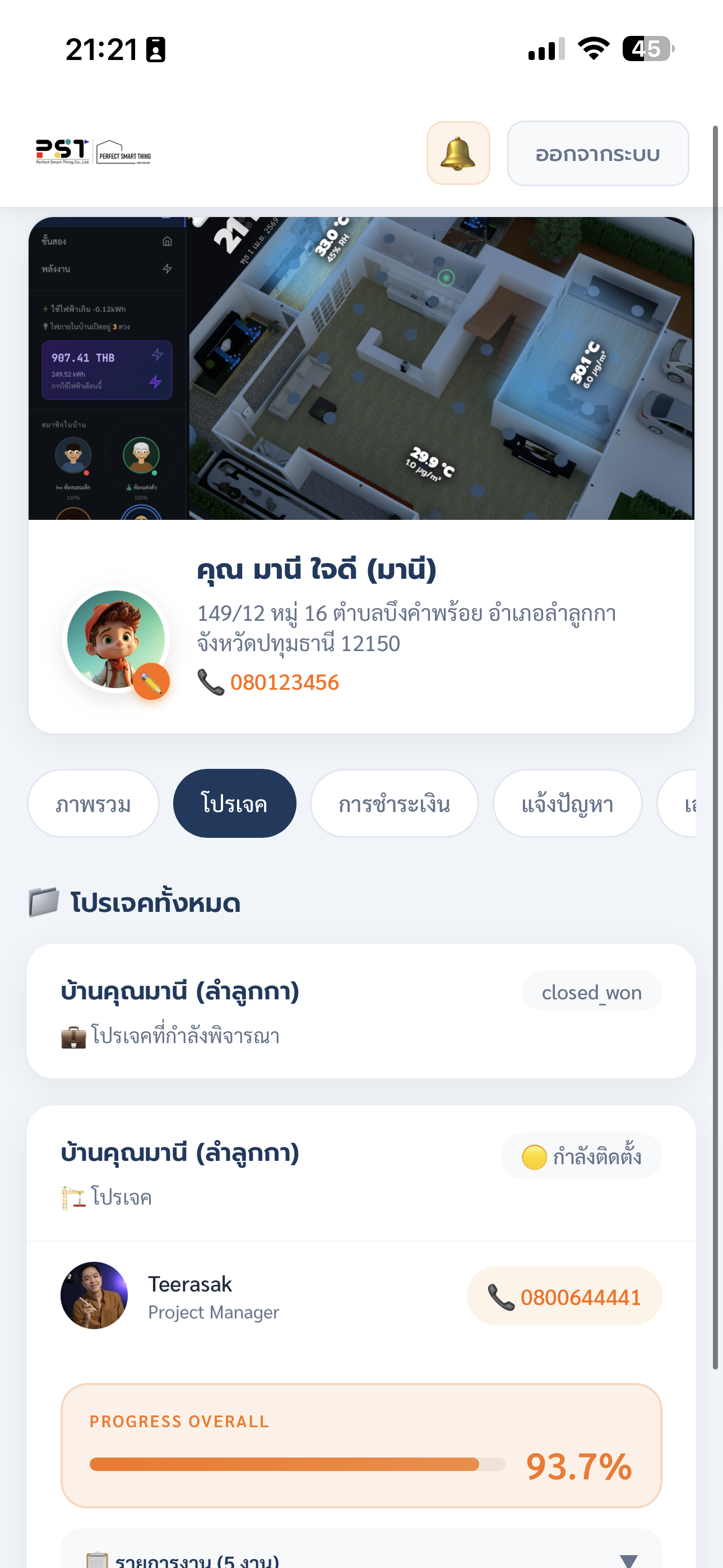
Peace of Mind — ติดตามโครงการได้ตลอดเวลาTrack Your Project Anytime
ความกังวลที่ลูกค้าหลายคนมีคือ "ไม่รู้ว่างานไปถึงไหนแล้ว" หรือ "ไม่แน่ใจว่าสิ่งที่ตกลงกันไว้จะออกมาตามนั้นไหม" — PST เข้าใจความรู้สึกนี้ดี จึงพัฒนา Customer Portal ขึ้นมาเพื่อตอบโจทย์นี้โดยตรงA common concern among clients is "I don't know how far along the work is" or "I'm not sure what was agreed will actually be delivered." PST understands this well, which is why we built the Customer Portal to address it directly.
📊
ติดตาม Progress Real-timeReal-time Progress Trackingเปิด Customer Portal บนมือถือ เห็น Progress Overall เป็นเปอร์เซ็นต์ เห็นรายการงานแต่ละรายการ และสถานะล่าสุด ได้ทุกที่ทุกเวลาOpen the Customer Portal on your phone — see overall progress as a percentage, every task item, and the latest status, anywhere at any time
📞
รู้ว่าใครรับผิดชอบงานของคุณKnow Who's Responsible for Your Projectเห็นชื่อและเบอร์ Project Manager ที่ดูแลโครงการโดยตรง ไม่ต้องโทรหาสายกลาง ติดต่อได้ตรงSee the name and number of the Project Manager handling your project directly — no call centres, direct contact
📋
รายการงานและ Milestone ชัดเจนClear Task List and Milestonesเห็น Task List ทั้งหมดของโครงการ งานไหนเสร็จแล้ว งานไหนอยู่ระหว่างดำเนินการ และงานไหนที่รอการยืนยันSee the full project task list — which tasks are done, which are in progress, and which are pending confirmation
8
Long-term Value
บริการหลังการขาย — ระบบที่ดีต้องมีคนดูแลหลังส่งมอบAfter-Sales Service — A Great System Needs Care After Handover
Smart Home ไม่ใช่สินค้าที่ซื้อแล้วจบ — มันคือ ระบบที่ต้องการการดูแลต่อเนื่อง ไม่ว่าจะเป็น Software Update, การปรับ Automation เมื่อไลฟ์สไตล์เปลี่ยน หรือการแก้ไขปัญหาที่อาจเกิดขึ้นหลังใช้งานจริง การเลือกผู้ให้บริการที่ดูแลหลังขายได้จริงคือส่วนหนึ่งของการลงทุนที่ฉลาดA Smart Home isn't a buy-and-forget product — it's a system that needs ongoing care: Software Updates, Automation adjustments as your lifestyle changes, and fixing issues that arise in real-world use. Choosing a provider with genuine after-sales support is part of a smart investment.
🛡️
รับประกัน 1 ปีหลังส่งมอบ1-Year Warranty After HandoverPST รับประกันระบบและอุปกรณ์ที่ติดตั้งทั้งหมดนาน 1 ปี หากมีปัญหาจากการใช้งานปกติ PST รับผิดชอบแก้ไขโดยไม่มีค่าใช้จ่ายเพิ่มPST warrants all installed systems and equipment for 1 year. Any issues from normal use are resolved by PST at no extra charge
🔄
Software Update & MaintenanceHome Assistant และ Firmware อุปกรณ์ต้องการ Update สม่ำเสมอ ทีม PST ดูแลให้ระบบอยู่ใน version ที่เสถียรและปลอดภัยอยู่เสมอHome Assistant and device firmware need regular updates. The PST team keeps your system on stable, secure versions at all times
💬
Support ที่ตอบสนองได้จริงSupport That Actually Respondsติดต่อ PST ได้ผ่านหลายช่องทาง ทีม Technical Support พร้อม Remote Access เพื่อวินิจฉัยและแก้ไขปัญหาได้โดยไม่ต้องรอช่างเข้าบ้านContact PST through multiple channels. The Technical Support team uses Remote Access to diagnose and fix issues without waiting for a technician to visit
🔧
Automation Tuning ตามชีวิตที่เปลี่ยนไปAutomation Tuning as Life Changesชีวิตเปลี่ยน Automation ก็ควรเปลี่ยนตาม PST ช่วยปรับและเพิ่ม Automation ใหม่ เพิ่มอุปกรณ์ หรือ Expand ระบบได้ตลอดเวลาAs life changes, so should your automations. PST can adjust and add new automations, add devices, or expand the system whenever you need it
เช็คความพร้อมReadiness Check
บ้านของคุณพร้อมแค่ไหน?How Ready Is Your Home?
ทำ Quiz 5 ข้อนี้เพื่อประเมินความพร้อมและรับคำแนะนำที่ตรงกับสถานการณ์จริงของคุณTake this 5-question quiz to assess your readiness and get advice tailored to your real situation.
🏠 Smart Home Readiness Check
ตอบตรงๆ — ไม่มีคำตอบที่ผิดหรือถูกAnswer honestly — there are no right or wrong answers
1. ตอนนี้บ้านหรือคอนโดของคุณอยู่ในขั้นตอนไหน?1. What stage is your home or condo currently at?
📐ยังอยู่ในขั้นตอนออกแบบ / มีแบบแปลนStill in design / have floor plans
🏗️อยู่ระหว่างก่อสร้างUnder construction
🔑ใกล้เสร็จหรือเสร็จแล้วแต่ยังไม่ย้ายเข้าNearly done or complete, not yet moved in
🛋️อยู่อาศัยแล้วAlready living there
1 / 5
2. สวิตช์ในบ้านของคุณเป็นแบบไหน (หรือวางแผนใช้แบบไหน)?2. What type of switch does (or will) your home use?
📐2×4 นิ้ว US Standard (แนวนอน)2×4 inch US Standard (horizontal)
บ้านที่ดีที่สุด เริ่มต้นจากการวางแผนที่ดีที่สุดThe Best Home Starts with the Best Plan
ทุกบ้านที่ PST ดูแล เริ่มต้นจากการ Consult ฟรี — ไม่ว่าคุณจะอยู่ในขั้นตอนไหน เรามีคำแนะนำที่ตรงกับสถานการณ์จริงของคุณEvery home PST handles starts with a free consultation — whatever stage you're at, we have advice that fits your real situation.
Consult ฟรี ไม่มีข้อผูกมัดFree consult, no obligation
ออกแบบตามบ้านจริงDesigned around your actual home
3D Floorplan เฉพาะของคุณCustom 3D Floorplan for your home
รับประกัน 1 ปีหลังติดตั้ง1-year warranty after installation
Customer Portal ติดตาม Real-timeReal-time tracking via Customer Portal